
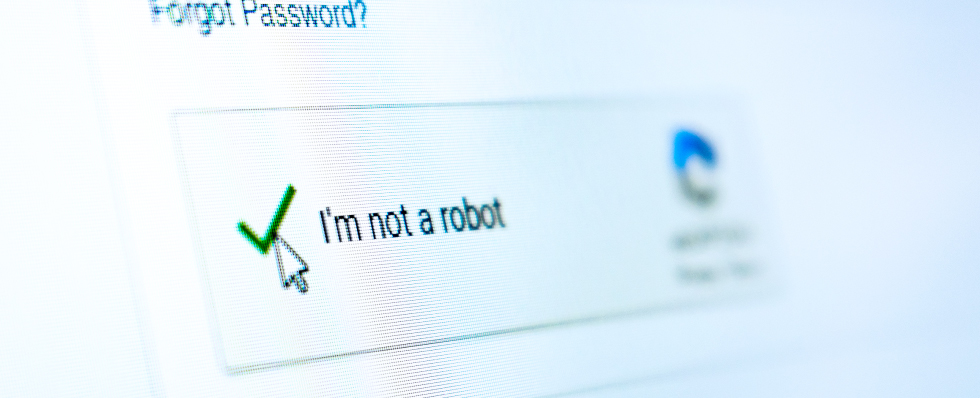
In their attempts to breach computer systems and steal sensitive personally identifiable information (PII), cybercriminals are constantly changing tactics and finding new ways to misuse technology. A recent trend illustrates how these criminals coopt existing technologies for their malicious schemes: CAPTCHA scams.
While CAPTCHA tests have been used for decades to help protect systems, they’ve become so common that users often don’t think twice when they encounter one.
Let’s review what CAPTCHA tests are, what they’re designed to do, how attackers are misusing the technology, and how you can take steps to protect yourself from falling victim.
What are CAPTCHA tests?
CAPTCHA stands for Completely Automated Public Turing test to tell Computers and Humans Apart. Introduced in the early 2000s, these tests are designed to ensure the visitor to a website is human — thereby keeping the site safe from the automated bots used in cyberattacks.
Some legitimate uses of CAPTCHA tests include:
- Preventing spam: By using CAPTCHA on contact forms and comment sections, website administrators can keep automated bots from sending spam messages or posting false information.
- Safeguarding account registrations: When accounts are being opened online, websites can use CAPTCHA tests to be sure humans are creating the account.
- Protecting the integrity of online surveys: Including a CAPTCHA test for online polls and surveys ensures respondents are human, stopping bots from manipulating the results.
- Security e-commerce sites: Using CAPTCHA tests as part of the payment process can reduce the risk of bots making fraudulent purchases.
How do CAPTCHA tests work?
These tests involve tasks humans can complete easily, but are difficult for automated programs to tackle. CAPTCHA tests usually involve prompting the user to identify a string of characters that are either distorted or presented on a difficult-to-read background. The related reCAPTCHA technology is a bit more advanced, requiring users to solve a simple puzzle or click on pictures of specific items — like “select all the pictures that include traffic lights.”
In addition to gauging the visitor’s responses, the more advanced reCAPTCHA technology might analyze a user’s computer cookies or browser history, looking for interactions that indicate if the visitor is human or a bot pretending to be human . It might also analyze how long it takes you to complete the test or how your pointer moves on screen.
What are CAPTCHA scams?
Given their role in online security, people trust the legitimacy of CAPTCHA tests when they come across them. Unfortunately, bad actors now exploit that trust by creating fake CAPTCHA prompts. While these fake tests appear legitimate, they’re designed to install malware on the user’s system, enabling bad actors to carry out different kinds of attacks.
The malware — frequently an information stealer or remote access tool — then gives the attackers control over the system, allowing them to steal sensitive information.
How do CAPTCHA scams work?
While they can also be presented in fraudulent ads or phishing emails, CAPTCHA scams are usually encountered on compromised websites. That means the attack can occur on a website that’s usually trustworthy — which makes it more difficult to recognize.
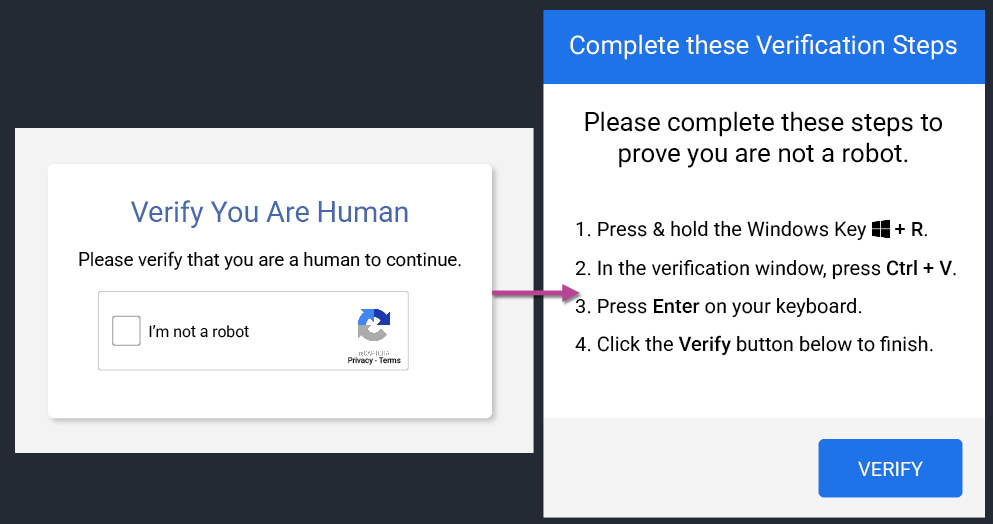
As the user interacts with the fake CAPTCHA, it may prompt the user to download a file, install a browser extension, or cut and paste a command line. Detailed instructions are usually provided to guide the victim through these steps. While the computer code may look benign, attackers can disguise the malicious code — so it looks like the verification code is legitimate when it is actually running completely unrelated commands.
The best advice is to be wary of any CAPTCHA test that requires multiple steps — particularly if it involves pasting (Ctrl + V) or running (Windows key + R) command lines or apps.
How to avoid CAPTCHA scams
Recognizing fake CAPTCHA tests is critical to avoid falling victim to these scams. To avoid fake CAPTCHA prompts, be sure to:
- Be skeptical: If you’re confronted by a CAPTCHA test where you wouldn’t normally expect one, think twice before proceeding.
- Check URLs: Before interacting with a CAPTCHA, make sure the website's URL is legitimate. What out for extra letters or numbers being substituted for letters. Check to for "https://", which can indicate a site is secure. Avoid sites with unusual domains. If you complete a CAPTCHA test and you’re redirected to a new page, check the URL again since a fake test on a compromised site can send you to a malicious page.
- Watch for red flags: If a CAPTCHA prompt asks for personal information, generates a suspicious pop-up screen, or requests you click “Allow” after completing the test, back out and navigate away from the site.
- Never download files: Remember CAPTCHA tests don’t need users to download software or extensions to operate. So if one prompts you to download something, it’s a scam.
- Don’t copy and paste commands: If you’re asked to paste (Ctrl + V) or run (Windows key + R) anything on your system, don’t do it unless you verify it is safe and you full understand what you’re doing.
- Keep software updated: Browsers, anti-malware software, anti-phishing solutions and other security tools can help stop users from landing on malicious websites with fake CAPTCHA prompts — but it’s important they’re kept up-to-date to be effective.
The bottom line: If you are at all suspicious of a CAPTCHA prompt, close the site and your browser immediately and scan your system for malware. If you entered your login credentials at any point during the CAPTCHA session, you’ll want to quickly change your password as well.
CAPTCHA scams on the rise
Since their introduction as a tool to combat automated bots, CAPTCHA tests have become an essential, trusted online tool. It was only a matter of time before cybercriminals would try using users’ trust in the technology against them.
The good news for users is that by understanding the risks CAPTCHA scams pose and learning to recognize them, you can better protect yourself, your devices and the personal data the bad guys are after.